
Content Delivery Network (CDN)
Overview
Scenario's Content Delivery Network provides secure, signed access to your assets with real-time transformation capabilities. The CDN delivers images, 3D models, and videos with features including resizing, format conversion, and optimization.
CDN Domain: cdn.cloud.scenario.com
URL Structure
Path Patterns
| Pattern | Purpose | Access |
|---|---|---|
/assets/* | Original asset files | Requires signed URL |
/assets-transform/* | Transformed assets (resized, converted, etc.) | Requires signed URL |
/thumbnails/* | Asset thumbnails | Public |
Signed URLs
All asset URLs (except thumbnails) are signed for security and expire automatically.
Expiration Policy
Signed URLs use a rolling expiration window optimized for caching:
| Date Range | Expiration Date |
|---|---|
| 1st - 7th | 14th of same month |
| 8th - 14th | 21st of same month |
| 15th - 21st | Last day of same month |
| 22nd - 31st | 7th of next month |
Minimum expiration: 24 hours from generation
Signed URLs include signature parameters (Policy, Signature, Key-Pair-Id) that are automatically added by the API.
⚠️ Never change the given signature query strings, it would result in an Access Denied Error.
Asset Transformation
Transform assets on-the-fly using the /assets-transform/{assetId} endpoint with query parameters.
Image Transformation Parameters
| Parameter | Type | Default | Values | Description |
|---|---|---|---|---|
width | integer | "auto" | auto | > 0 | Target width in pixels |
height | integer | "auto" | auto | > 0 | Target height in pixels |
quality | integer | 100 | 1-100 | Compression quality |
format | string | origin | See below | Output format |
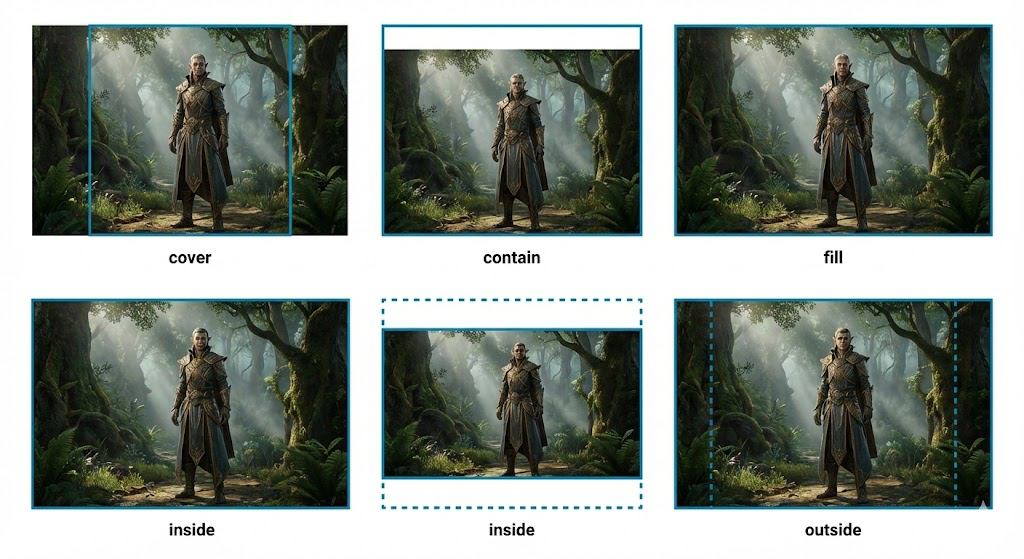
fit | string | cover | cover, contain, fill, inside, outside | Resize mode |
rotate | integer | 0 | 0-360 | Rotation in degrees |
blur | integer | 0 | 0-100 | Blur strength |
greyscale | boolean | false | true, false | Convert to greyscale |
flatten | boolean | false | true, false | Remove transparency |
background | string | ffffff | Hex (no #) | Background color when flattening |
Supported Formats
Image Formats:
jpeg/jpg- JPEGpng- PNG with transparencywebp- Modern WebP formatavif- Next-gen AVIF formattiff/tif- TIFForigin- Keep original formatauto- Auto-select best format
3D Model Formats:
glb- Binary glTFobj- Wavefront OBJfbx- Autodesk FBX
Resize Modes (fit parameter)
cover(default) - Crop to fill dimensions, maintains aspect ratiocontain- Scale to fit within dimensions, may add letterboxingfill- Stretch to exact dimensions, may distortinside- Scale down to fit within dimensions onlyoutside- Scale to cover dimensions, may crop
Example Transformations
# Resize to 512x512, convert to WebP
https://cdn.cloud.scenario.com/assets-transform/{assetId}?width=512&height=512&format=webp&quality=90&Policy=...&Signature=...&Key-Pair-Id=...

# Auto-width, 1024px height, maintain aspect ratio
https://cdn.cloud.scenario.com/assets-transform/{assetId}?height=1024&width=auto&fit=inside&Policy=...&Signature=...&Key-Pair-Id=...

# Convert to greyscale with slight blur
https://cdn.cloud.scenario.com/assets-transform/{assetId}?greyscale=true&blur=5&Policy=...&Signature=...&Key-Pair-Id=...

# Convert 3D model to GLB format
https://cdn.cloud.scenario.com/assets-transform/{assetId}?format=glb&Policy=...&Signature=...&Key-Pair-Id=...

# Flatten transparency with custom background
https://cdn.cloud.scenario.com/assets-transform/{assetId}?flatten=true&background=000000&Policy=...&Signature=...&Key-Pair-Id=...
API Usage
Get Asset Download URL
Generate a signed download URL with optional format conversion.
Endpoint: POST /v1/assets/{assetId}/download
Request:
{
  "targetFormat": "webp"  // Optional - any supported format
}Response:
{
  "url": "https://cdn.cloud.scenario.com/assets-transform/{assetId}?format=webp&Policy=...&Signature=...&Key-Pair-Id=..."
}
Asset Object URLs
When retrieving assets through the API (e.g., GET /v1/assets), the response includes a pre-signed url field:
{
  "assets": [{
    "id": "asset-id",
    "url": "https://cdn.cloud.scenario.com/assets-transform/{assetId}?...",
    ...
  }]
}
These URLs are already signed and ready to use.
Caching
- Transformed assets are cached for faster subsequent access
- Cache duration: Up to 24 hours (respects signed URL expiration)
- Cache key: Based on asset ID and transformation parameters
For consistent cache hits, use the same transformation parameters. Varying parameters (e.g., width=512 vs width=513) will create separate cache entries.
Best Practices
Performance
- Use WebP or AVIF for modern browsers to reduce bandwidth
- Specify exact dimensions when possible to optimize caching
- Set appropriate quality (80-90 typically sufficient for web)
- Use
fit=insideto prevent upscaling small images
Format Selection
- PNG: When transparency is required
- JPEG: For photos without transparency
- WebP: Best compression for modern browsers
- AVIF: Smallest file size, newer browser support
- Auto: Let the CDN choose based on browser support
Dimensions
- Thumbnails: 256x256 or 512x512
- Preview: 1024px on longest side
- Full quality: 2048px or original size
- Use
autofor one dimension to maintain aspect ratio
Updated 2 months ago